t

gpt image 2
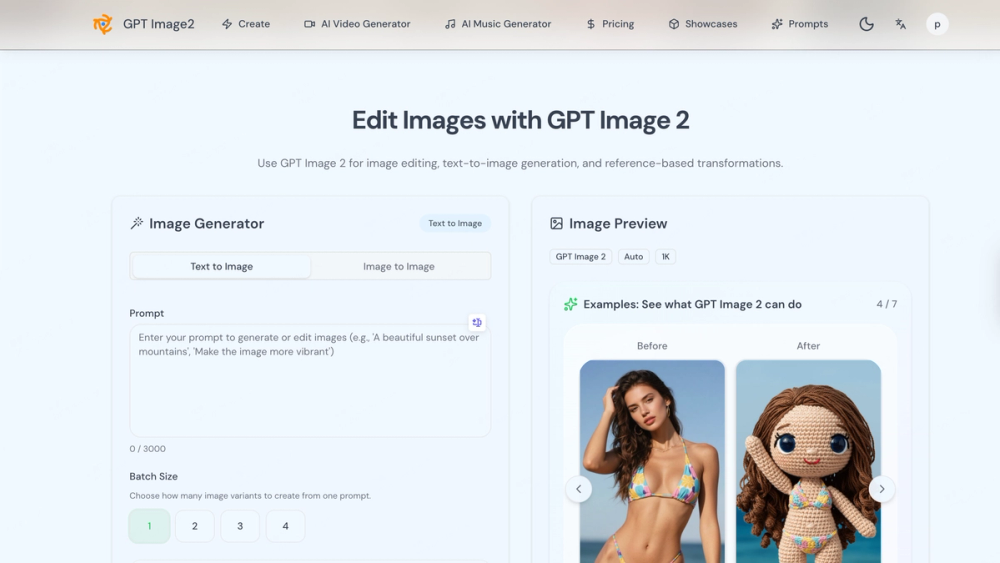
GPT Image2 is a browser-based AI image creation and editing platform with text-to-image, image-to-image, partial repaint, UI mockups, and marketing visuals for fast iteration.
Introduction
Product Gallery
1 / 3
Click to enlarge
Common Use Cases
- Create posters & social media thumbnails quickly
- Turn reference images into a new style
- Retouch a specific region via partial repaint
- Generate UI concept visuals for landing pages
- Produce marketing images for product launches
Industry Applications
SaaS & product teamsE-commerce & retail brandsMarketing & advertisingUI/UX & design studiosEducation & content creation
Limitations to Consider
- *Best results depend on prompt clarity and reference image quality
- *Complex edits may require multiple iterations
- *Highly specific output may need several retries
Explore More in 3D
Discover additional tools and resources in the 3d category
Disclaimer & Important Notice
The information provided about **gpt image 2** is for general informational purposes only. While we strive to keep the content accurate and up-to-date, we make no representations or warranties of any kind, express or implied, about the completeness, accuracy, reliability, suitability, or availability of the tool, information, or related graphics.
Use at your own risk: AI tools may produce incorrect, misleading, or outdated information. Always verify critical information independently and exercise judgment when using AI-powered services.
Affiliate disclosure: Some links may be affiliate links. If you make a purchase through these links, we may earn a commission at no additional cost to you. This helps support our platform and allows us to continue providing free content.
Last updated: 9/6/2026
How to Get Started
Step 1: Create from a text prompt
Enter a clear description of the image (style, subject, composition) and generate.
Step 2: Generate a reference-based edit
Upload an image you like, then apply an image-to-image transformation to reach the desired style.
Step 3: Refine with partial repaint
Target a region to modify and regenerate only that part for precise improvements.
Step 4: Iterate to improve quality
Review outputs, tweak the prompt, and regenerate until it matches.
Step 5: Export for use
Use the final generated image for landing pages, social posts, UI mockups, ads, or presentations.
Pricing Plans
| Plan | Price | Features |
|---|---|---|
| Starter Plan | $9.99/month |
|
| Premium Plan | $99.99/year |
|
| Credits Package (one-time) | $10.99 / 500 credits |
|
Pros
- Generate posters, social media thumbnails, product images, UI mockups, and marketing visuals from text prompts.
- Image-to-image style conversion and upgrades using reference images.
- Partial repaint to refine only specific regions for precise retouching.
- UI concept diagrams and app/dashboard/landing page visual sketches.
- Fast iteration workflow: generate, adjust, retry, and export in one place.
Cons
- Learning the best prompt/reference style may take some time.
- Complex edits may require multiple iterations.
- Quality depends on input image resolution and prompt specificity.
Frequently Asked Questions
Reviews
No ratings yet.
No reviews yet. Be the first to review.
Information
- PublishersunnyU sunnyU
- Websitewww.trygptimage.com
- Published date2026/09/06
- Last updated
Categories
- 3D Tools
- Literature Review Tools
- Academic Writing Tools
- Study & Learning Tools
- AI Finance Tools
- Recruiting Tools
- Education Tools
- Automation Tools
- API & Integrations Tools
- Developer Tools Tools
- Analytics Tools
- Email Marketing Tools
- Ai Social Media Tools
- SEO Tools
- Global Marketing Tools
- Customer Support Tools
- AI Models & LLMs Tools
- Growth Tools
- Forms & Surveys Tools
- Website Creation Tools
- No-Code / Low-Code Tools
- Platforms Tools
- Inspiration Tools
- Management Tools
- Note-taking Tools
- Copywriting Tools
- Typography Tools
- Image Resources Tools
- Image Editing Tools
- Audio Recording Tools
- Audio Editing Tools
- Screen Recording Tools
- Video Resources Tools
- Video Editing Tools
- Others Tools
Browse related tools in the same category
Tags
Filter tools by specific features and use cases
Explore similar tools that might offer different features or pricing
Alternatives to gpt image 2
GPT Image 2
GPT-Image2.me is a free AI image generator and editor powered by the latest GPT-Image-2 model, offering superior prompt understanding and text rendering.
Image Editing
Top 10 Alternatives to VideoToURL for Video Hosting
Free online tool to convert MP4 videos to permanent, shareable URLs instantly. Supports MP4, MOV, AVI, WebM, MKV up to 100MB. No registration required.
Video Resources
For Web developers
ArchyBase
All-in-one AI design platform for architects and homeowners. Generate professional interior, exterior, and landscape renders from photos or sketches in seconds.
Image Editing
top alternative to graphy
Create professional graphs and charts in seconds.
Analytics
Discover more 3d tools with similar capabilities
More 3D
Top alternatives to KDP Cover Creator
Create, fix, and export KDP-compliant book covers and formatting workflows effortlessly without print-spec guesswork.
Developer Tools
top alternative for sora 2
Unleash cinematic AI video generation locally with Sulphur 2—the unrestricted, open-source 9B parameter model built for ultimate creative freedom.
Video Editing
FluxMov
Use Motion Control AI to guide character movement with a reference video. Reduce prompt guesswork, face drift, random motion, and failed AI video retries.
Video Editing
FormRoyale
Survey Software That Turns Feedback Into Action. Create employee and customer surveys in minutes. Collect honest responses.
Analytics