
LogoAIBestTop
icon of BookCoversLab

BookCoversLab

Create, fix, and export KDP-compliant book covers and formatting workflows effortlessly without print-spec guesswork.

Introduction

BookCoversLab helps indie authors and designers create, fix, and export KDP‑ready covers without print-spec guesswork.

What it does
  • Turn KDP rules into a clear, guided workflow.
  • Start with the right trim, spine, and bleed so your file is compliant from the beginning.
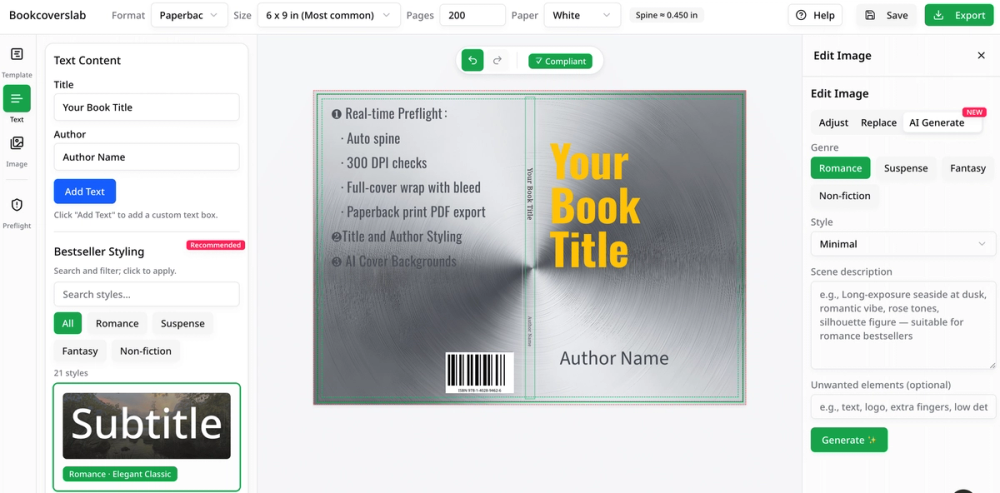
  • Preflight your cover for size, bleed, spine, and print issues before export.
  • Fix rejected KDP files without rebuilding your design from scratch.
  • Convert an existing ebook cover into a full paperback or hardcover wrap.
  • Generate AI cover ideas that match your genre and refine them into a final cover.
Why it’s different

Generic design tools help you design; BookCoversLab helps you publish.
It focuses on KDP-specific checks, print‑ready PDF export, and workflows for common self‑publishing jobs like coloring books, series covers, and format conversions.

Pricing

BookCoversLab offers one‑time paid workflows (no subscription), including:

  • AI Print – single paperback export
  • AI Print Pro – enhanced KDP print compliance and revisions
  • AI Author Suite – ebook + paperback + hardcover
  • AI Marketing Suite – covers plus marketing creatives and A+ content

Product Gallery

Product gallery image 1 for BookCoversLab
1 / 3
Click to enlarge

Key Features

6 features
KDP Cover Size Calculator
AI Book Cover Generator
eBook Cover to KDP Paperback Converter
Coloring Book Formatting Fixes
KDP Cover Preflight Check
Print-ready PDF Export

Auto-scrolling • Hover to pause

Common Use Cases

  • Fixing a cover file that keeps getting rejected by Amazon KDP
  • Generating genre-fit AI book cover ideas during the drafting stage
  • Automatically generating a 300-DPI print-ready PDF wrap

Industry Applications

Self-Publishing and KDP Print-on-DemandBook Design and Digital Art Direction

Limitations to Consider

  • */
  • *
  • *

Explore More in Developer Tools

Discover additional tools and resources in the developer tools category

Disclaimer & Important Notice

The information provided about **BookCoversLab** is for general informational purposes only. While we strive to keep the content accurate and up-to-date, we make no representations or warranties of any kind, express or implied, about the completeness, accuracy, reliability, suitability, or availability of the tool, information, or related graphics.

Use at your own risk: AI tools may produce incorrect, misleading, or outdated information. Always verify critical information independently and exercise judgment when using AI-powered services.

Affiliate disclosure: Some links may be affiliate links. If you make a purchase through these links, we may earn a commission at no additional cost to you. This helps support our platform and allows us to continue providing free content.

Last updated: 7/9/2026

How to Get Started

Step 1: Step 1: Start with real specs

Enter your trim size, page count, paper type, or upload the existing file you need to fix.

Step 2: Step 2: Create or fix the file

Build your cover artwork or repair formatting bottlenecks inside the KDP-focused workspace.

Step 3: Step 3: Preflight and export

Run automatic checks to find upload blockers, then download your print-ready PDF for Amazon KDP.

Pricing Plans

PlanPriceFeatures
AI Print$19.99
  • 1x Professional Print-ready PDF
  • AI cover generation (3x)
  • Free social sharing
AI Print Pro$39.99
  • KDP print-ready PDF (Paperback)
  • 300DPI auto-conversion
  • Unlimited preview
  • AI cover generation (10x)
  • 3 free revisions
AI Author Suite$59.99
  • KDP hardcover cover PDF
  • KDP paperback + eBook cover
  • All-format KDP technical compliance
  • AI cover generation (20x)
  • 5 free revisions
AI Marketing Suite$89.99
  • AI-generated social ad creatives (20)
  • Includes everything in AI Author Suite
  • AI cover generation (40x)
  • 10 free revisions

Pros

  • Eliminates KDP upload guesswork with precise technical compliance
  • Saves time with adaptive layout scaling when page count changes
  • All-in-one workflow for creation, technical checks, and export

Cons

  • Highly focused on KDP, fewer generic design features
  • Advanced print compliance and exports require paid plans

Frequently Asked Questions

Reviews

No ratings yet.

No reviews yet. Be the first to review.

Reviews are published after moderation.

Last reviewed: Originally published:

This page is regularly updated to ensure accuracy and freshness.

Newsletter

Join the Community

Subscribe to our newsletter for the latest news and updates