LogoAIBestTop
icon of NanoGPT

NanoGPT

AI-powered image editing platform using the Nano Banana AI model for background removal, artistic effects, and professional image transformations.

Introduction

NanoGPT Overview

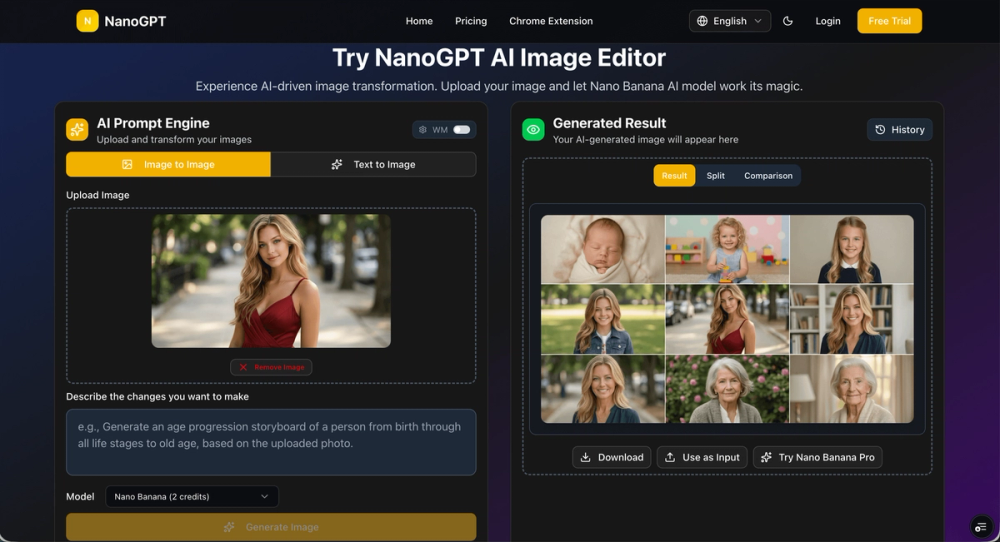
NanoGPT is an AI-driven image editing platform that leverages the advanced Nano Banana AI model (unofficially Gemini 2.5 Flash Image) to provide users with professional-grade image editing capabilities. It focuses on making complex image transformations, background removal, and artistic effects accessible to users of all skill levels. NanoGPT offers a suite of tools designed to enhance creativity and streamline image editing workflows directly in the browser.

Key Features

NanoGPT provides a range of AI-powered tools, including:

  • Photo to Line Drawing AI: Converts photos into clean, AI-generated sketches.
  • AI 3D Figurine Generator: Transforms 2D images into stunning 3D figurines.
  • AI Background Remover: Automatically removes image backgrounds for transparent PNGs.

These tools are designed to be user-friendly and deliver high-quality results quickly, making NanoGPT a versatile solution for various image editing needs.

Product Gallery

Product gallery image 1 for NanoGPT
1 / 4
Click to enlarge

Key Features

10 features
AI-powered image editing
Background removal
Photo to line drawing conversion
AI 3D figurine generation
Support for major image formats (JPEG, PNG, WebP)
User-friendly interface
Chrome extension for direct browser editing
Secure image processing
Fast and accurate results
Professional-grade image transformations

Auto-scrolling • Hover to pause

Common Use Cases

  • Creating product mockups with transparent backgrounds
  • Generating line art for coloring books or design projects
  • Transforming photos into 3D figurines for personalized gifts
  • Enhancing social media visuals with AI-driven effects

Industry Applications

E-commerceDigital Marketing

Limitations to Consider

  • *Requires internet connection for AI processing
  • *Image generation quality depends on the input image

Explore More in Image Editing

Discover additional tools and resources in the image editing category

Disclaimer & Important Notice

The information provided about **NanoGPT** is for general informational purposes only. While we strive to keep the content accurate and up-to-date, we make no representations or warranties of any kind, express or implied, about the completeness, accuracy, reliability, suitability, or availability of the tool, information, or related graphics.

Use at your own risk: AI tools may produce incorrect, misleading, or outdated information. Always verify critical information independently and exercise judgment when using AI-powered services.

Affiliate disclosure: Some links may be affiliate links. If you make a purchase through these links, we may earn a commission at no additional cost to you. This helps support our platform and allows us to continue providing free content.

Last updated: 1/21/2026

How to Get Started

Step 1: Upload Your Image

Start by uploading the image you want to edit to the NanoGPT platform. Supported formats include JPEG, PNG, and WebP.

Step 2: Select an AI Tool

Choose from a range of AI tools such as Background Remover, Photo to Line Drawing, or AI 3D Figurine Generator.

Step 3: Customize Settings

Adjust any relevant settings or parameters for the selected tool to achieve your desired outcome.

Step 4: Generate and Download

Click the 'Generate' button to process your image. Once complete, download the edited image in your preferred format.

Pricing Plans

PlanPriceFeatures
Contact for PricingCustomContact for details

Pros

  • Easy-to-use AI image editing tools
  • Quick background removal and image transformations
  • Chrome extension for convenient access
  • Utilizes advanced AI models for high-quality results
  • Offers a variety of creative image editing options

Cons

  • Requires an internet connection
  • Image quality depends on the original image
  • Pricing information not readily available

Frequently Asked Questions

Reviews

No ratings yet.

No reviews yet. Be the first to review.

Reviews are published after moderation.

Last reviewed: Originally published:

This page is regularly updated to ensure accuracy and freshness.

Information

  • Publisher
    Sunfin Lee
  • Websitenanogpt.net
  • Published date2026/01/21
  • Last updated

About the Founder

Categories

Browse related tools in the same category

Tags

Filter tools by specific features and use cases

Explore similar tools that might offer different features or pricing

Discover more image editing tools with similar capabilities

Newsletter

Join the Community

Subscribe to our newsletter for the latest news and updates